





























Trusted By












As Seen In

Keywordtool.io is a great resource that not only scrapes data from Google but also YouTube, Bing, Amazon and Instagram to offer insights into search behaviour on a host of platforms. The subscription version of the tool can reveal search volumes and CPC information, but if you can do without that and are just looking for keyword inspiration, the free offering is spot on.

Keyword Tool is used by many leading SEO's to find long-tail and related keywords. Relying on Google's autocomplete feature, it gives you quick access to popular search terms.

Use Keyword Tool to find YouTube search phrases and keyword terms based on YouTube autocomplete.
Keyword Tool for YouTube
Creating a good YouTube video that will get many views takes time and resources. But it is worth the effort. A good video can do an excellent job of promoting your products or services, bring visitors to your website, and drive conversions.
But just creating a good video will not be enough to achieve those objectives. You need to make sure that people will be able to find the video that you have created. You need to put your video in front of your target audience. That is what Keyword Tool for YouTube will help you to achieve.
Keyword Tool for YouTube is a free keyword research tool that helps you find the keywords, tags, and hashtags that people are using when they search on YouTube.com. Whether you are optimizing regular videos or YouTube Shorts, Keyword Tool will help you discover what your audience is searching for.
See What Over 1 Million Marketers Already Know
From Fortune 500 SEO team leads to solo bloggers. They all use Keyword Tool. Here is what they say:



In a world with 1 billion SEO tools, Keyword Tool Pro is the only one that I absolutely use every day. Honing in on the perfect wording when targeting the biggest keywords in entertainment is as essential to my job as my coffee mug.

For the last 3 years, I've used Keyword Tool Pro to refine my content to match relevant search intent, find long-tail keyword opportunities, and crunch search volume for large keyword lists.

Keyword Tool Pro helps us identify long-tail keyword opportunities. It gives us great insight into keyword targeting and content topic opportunities that drive qualified and high converting traffic.
Best YouTube Keyword Tool Alternative
YouTube does not offer its own keyword research tool. The only way to get keyword data from Google is through the Google Ads platform, which requires you to create an account and was designed for paid advertising. Keywords that you will find there tend to be very general because Google wants you to use broad terms with high search volume for your ads. This makes more revenue for Google but does not necessarily help you find the right keywords for your content.
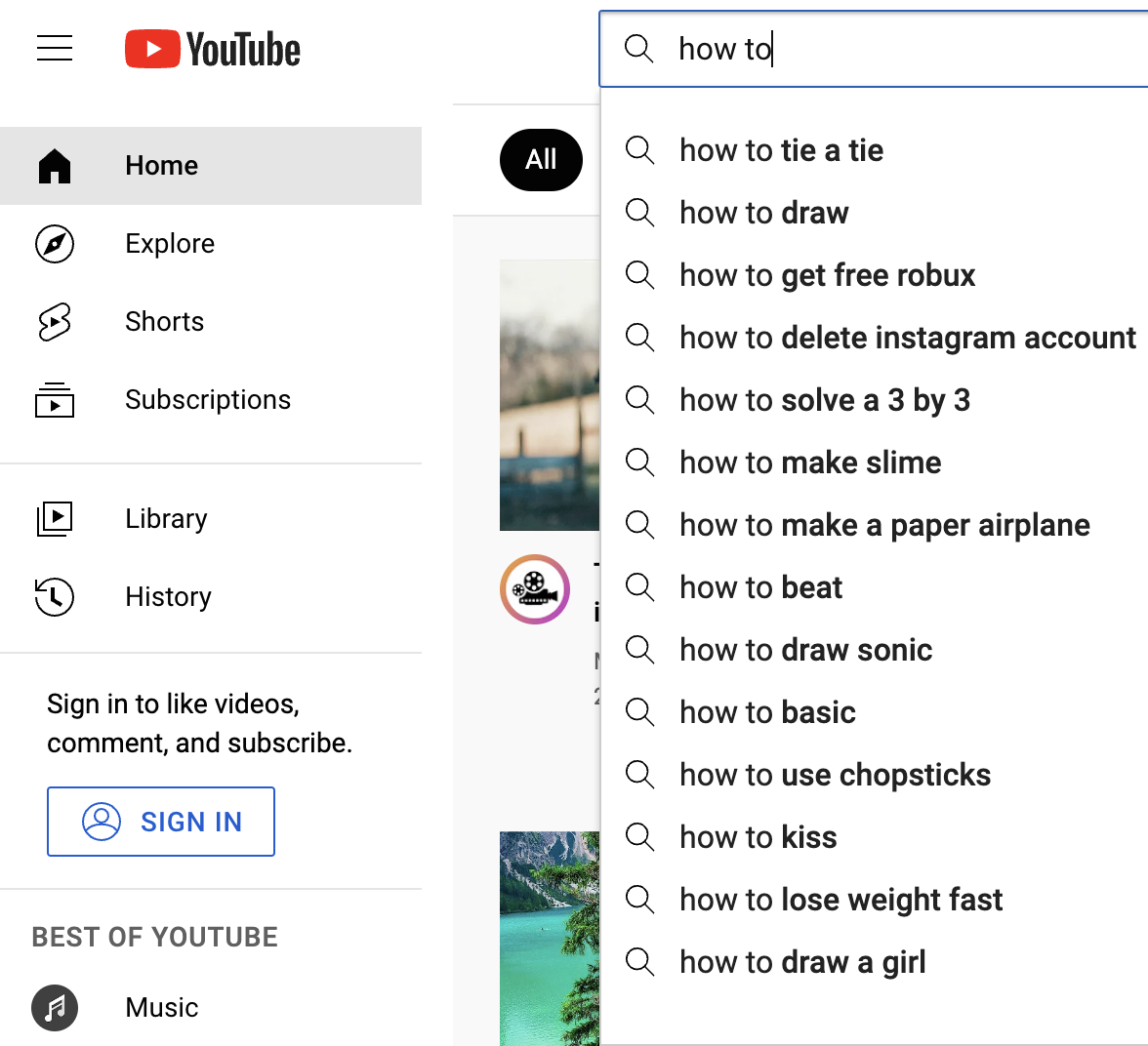
Keyword Tool is the best YouTube keyword tool alternative. It uses the YouTube autocomplete feature to generate highly relevant long-tail keywords about a particular topic. YouTube autocomplete was created to make the user experience better. It helps users find videos faster by recommending related keywords when they start typing in their search query.
Keyword Tool for YouTube helps you get over 750+ long-tail keywords from YouTube autocomplete by appending and prepending the keyword that you specify with various letters and numbers. To make keyword suggestions more relevant, Keyword Tool allows you to localize results to all countries and languages supported by YouTube.
YouTube SEO and Video Keyword Optimization with Keyword Tool
If you are looking for a YouTube SEO tool for keyword research and video optimization, Keyword Tool will be very useful to you. The algorithm that ranks YouTube videos takes a variety of factors into consideration when ranking videos for a particular search query.
We do not know what those factors are exactly, but what we do know is keywords that are used in video titles and descriptions are very critical. These keywords allow the algorithm to understand what your video is about and show it to the right audience.
Keyword Tool will help you to find the right keywords that you can use in YouTube video description and title. By finding the right keywords and properly using them in your video title and description, you will help Google to serve your video to the right audience both on YouTube and Google Search.
Title (100/100)
Description (keywords indexed by the ranking algorithm)
Tags
Come Up with YouTube Video Ideas Using Keyword Tool
Ideas ranked by estimated monthly searches
+ hundreds of fresh video ideas per seed keyword
If you want to make a popular YouTube video, you should make it based on a good idea. That is why so many video creators are constantly looking for good YouTube video ideas, especially those looking for ways on how to make money on YouTube. Actually, there is an infinite source of excellent YouTube video ideas that you can get access to at any time!
Do you know that there are millions of people that are searching for something on YouTube every single day? Fortunately, YouTube is trying to make it easier for people to find what they are looking for. Which is why every time you make a search on YouTube, you will see a list of suggested terms as you start typing your search query. Usually, the most popular and relevant YouTube searches show up in these suggestions.
Think about it for a second, there are hundreds of millions of people that are trying to find videos that they think would be worthwhile to watch on YouTube. What can be a better source of video ideas if not all these searches?
The great news is that with Keyword Tool, you can generate hundreds of ideas for YouTube videos in seconds. Just type in any topic that you want to create a video about, press enter, and let Keyword Tool generate hundreds of potential video ideas for you using YouTube autocomplete.
Generate List of Tags for Your YouTube Videos Using Keyword Tool
YouTube allows you to add a list of tags to new or existing YouTube videos. Many experts agree that YouTube tags play a critical role in video optimization by helping YouTube understand the content and context of your video.
Keyword Tool is an extremely useful YouTube keyword generator and tag generation instrument. By pulling relevant keywords from YouTube's autocomplete, Keyword Tool will help generate over 750 YouTube tags for your video within seconds. Just enter the topic of a video into the search box to pull the list of keywords that can be used as tags.
For your convenience, Keyword Tool separates generated keywords with commas when you copy them. All you need to do is simply select the relevant tags, copy, and paste them right into the corresponding field under your YouTube video.
Keyword Tool for YouTube Video Ads

Keyword Tool helps us not just in keyword research, but also in pitching potential customers. We clearly show them what keywords they are missing out in their PPC and SEO.
If you are running video advertising on YouTube, you know that keywords are one of the best ways to target your ads. Selecting the right keywords will help you to find the right audience for your ads.
In its support article on creating effective video ads, Google recommends to choose relevant keywords and promotion text to get your video content in front of interested viewers. Keyword Tool helps you find those keywords by pulling them directly from YouTube's autocomplete.
Find Popular YouTube Hashtags to Get More Views
In the past, a quick and easy way to get gain more visibility was to buy YouTube views. But using shortcuts or black hat methods are rarely a good idea. Instead, there are other better alternatives to get more YouTube views. One of them is to make full use of YouTube hashtags.
Hashtags have become a widely used feature across many social media platforms. They first became famous on Twitter, grew to be huge on Instagram, and have gotten even bigger on YouTube.
The YouTube hashtags feature was introduced as a way to increase discoverability of videos on the platform. It allows viewers to easily find related videos by clicking on hashtags shown on content that they enjoy. At the same time, it helps content creators to gain more visibility by leveraging on trending hashtags.
If you would like to know how to use hashtags to get popular on YouTube, you can use Keyword Tool as a YouTube hashtag generator. All you need to do is key in the topic related to your video in the search bar. From the results, you can select relevant, high-volume hashtags to insert in your video titles and descriptions to help people find your content.

Keyword Tool Pro is my first stop when investigating and vetting ideas for our blog posts. It's incredibly easy to use and understand which saves me tons of time in content development!
Find Tags and Keywords for YouTube Shorts
Under 25 chars · est. monthly searches on YouTube
Filter by length, post count, or trend to pick tags that fit the feed.
Are you creating YouTube Shorts? If so, you already know that Shorts compete in a fast-scrolling feed where every detail matters. Just like regular YouTube videos, Shorts need to be optimized with the right keywords and tags to reach the widest possible audience.
The challenge with YouTube Shorts is that they have limited title length and compete for attention in a fraction of a second. This makes it even more important to choose the right keywords, so that every word in your title counts. You need to identify the most relevant and popular trending search terms to give your Shorts the best chance of being discovered.
Just enter a topic related to your Short in the search box, and Keyword Tool will generate hundreds of keyword suggestions. You can discover trending topics and viral keywords that work well with the Shorts format and use them to optimize your titles, descriptions, and tags.
By using the right tags for YouTube Shorts, you can help your content appear in both the Shorts feed and YouTube search results, giving your videos more opportunities to be discovered.
Find Trending and Viral YouTube Keywords
Do you want to get more views on YouTube? One of the best ways to do it is to create videos about topics that are currently trending. When you publish a video on a trending topic early, you have a much better chance of getting views before the competition increases.
Because Keyword Tool pulls data directly from YouTube autocomplete, the keyword suggestions reflect what people are actually searching for right now. This makes it an excellent tool for finding trending YouTube tags and keywords before they become overly competitive. You can also use Google Trends alongside Keyword Tool to validate which topics are gaining momentum.
Use these trending keywords to create timely content, add relevant tags to your videos, and write titles and descriptions that match what people are searching for. Whether you are a content creator looking for the next viral video idea or a marketer trying to capitalize on current trends, Keyword Tool will help you find these keywords before the competition catches up.
Spot rising tags before they saturate and retire the ones in decline.
YouTube Channel Keywords and Optimization

Keyword Tool gives us very valuable long-tail keywords for research and content creation for our clients - highly recommended!
Did you know that in addition to optimizing individual videos, it is important to set the right keywords for your YouTube channel as a whole? YouTube channel keywords help the platform understand what your channel is about and recommend it to the right audience.
Channel keywords are different from video tags. They describe the overall topics and themes of your channel rather than the content of a specific video. You can add channel keywords in YouTube Studio by navigating to the channel customization settings. Choosing the right channel keywords can help your channel show up in YouTube search results and get recommended alongside similar channels.
How do you find the best keywords for your channel? Start by entering the main topics that your channel covers into Keyword Tool, and it will generate a list of related keywords that you can use to optimize your channel settings. This will help YouTube better understand your content and show it to viewers who are interested in your niche.
YouTube Keyword Research with Search Volume Data
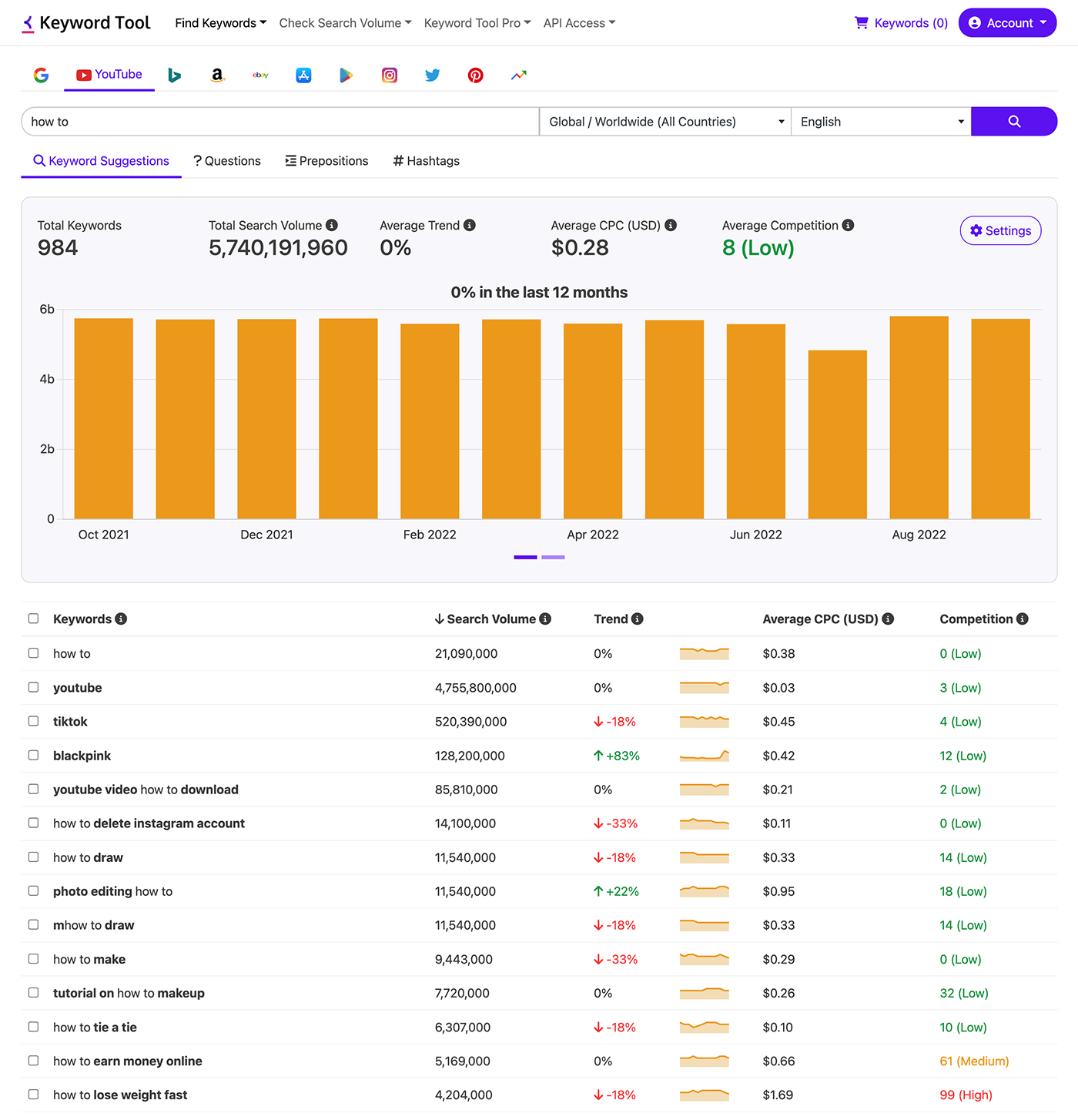
Have you ever wondered how many people are actually searching for a particular keyword on YouTube? While the free version of Keyword Tool generates hundreds of keyword suggestions, understanding the search volume behind those keywords is equally important. Search volume tells you how many people are searching for a particular keyword each month, helping you prioritize the terms that will bring the most traffic to your videos.
Keyword Tool Pro provides estimated search volume data for YouTube keywords, along with historical trend data spanning up to 12 months that shows whether a keyword is growing or declining in popularity. You can spot seasonal patterns and plan your content calendar around the times when demand is highest.
With Keyword Tool Pro, you can also upload up to 1,000 keywords in bulk to get search volume data for all of them at once. This is especially useful if you already have a list of keywords and want to quickly prioritize the best ones. When you are done, you can export your results to CSV or Excel, or use the Keyword Tool API and MCP server to automate your keyword research with AI-powered workflows using Claude, ChatGPT, or your own tools.
And YouTube is just one of 16 platforms supported by Keyword Tool. The same keyword research workflow is available for Google, Amazon, TikTok, Instagram, and more. Each platform has different search behavior and intent, so doing keyword research across multiple platforms can help you reach your audience wherever they search.
$ claudeYou: Find trending YouTube tags for "productivity tips". Focus on Shorts-friendly terms under 25 characters. Export top picks to CSV.Claude: I'll pull autocomplete suggestions plus trend and volume data via Keyword Tool MCP.╭─ keyword_search(keyword="productivity tips", platform="youtube", country="us")╯─ Retrieved 487 keywords with volume and 12-month trend data╭─ keyword_search(keyword="productivity hacks", platform="youtube", country="us")╯─ Retrieved 312 keywords, merging with previous setFiltering for Shorts-friendly length and growing trend slope...Claude: Top trending, Shorts-friendly tags: productivity hacks 2026 +67% 5.4K/mo productivity tips students +43% 3.2K/mo morning productivity +38% 2.8K/mo deep work tips +31% 2.1K/mo focus techniques +29% 1.9K/mo ...15 more with similar momentum Exported 20 tags to productivity-youtube-tags.csv자주 묻는 질문

KeywordTool.io has enabled us to quickly identify SEO growth opportunities, do keyword research at scale, and gather data at different geo levels. Its intuitive UX and advanced keyword filtering have played a significant role in the international expansion of our SEO program. Personally, I have used KeywordTool.io for more than 6 years, and it has proved to be an excellent software for start-ups, agencies and enterprises.
Start Using Keyword Tool Now
Find Keywords